
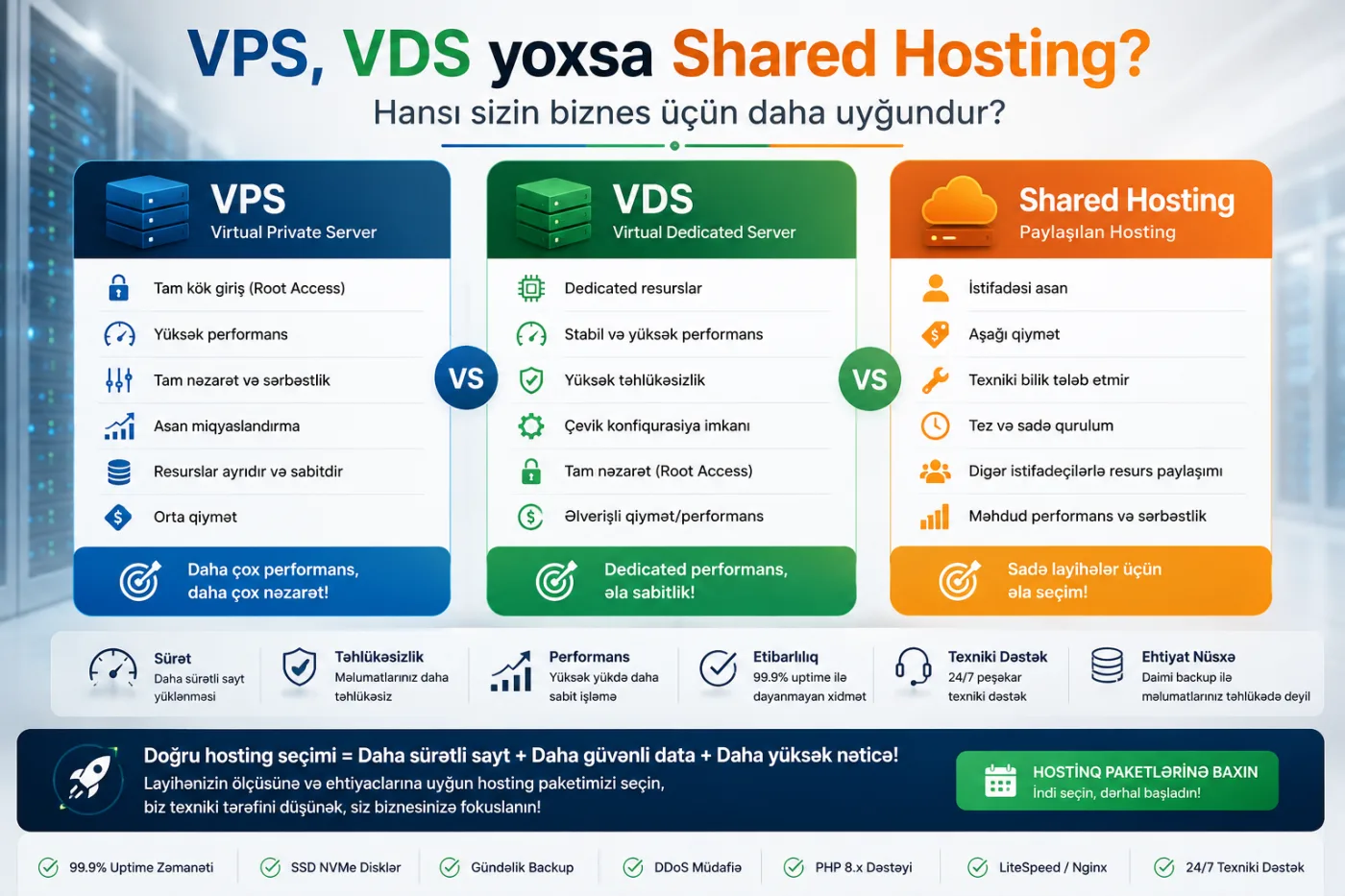
Choosing between Shared Hosting, VPS and VDS can feel unnecessarily technical. The practical decision is simpler: how much performance, control, security and room for growth does your website need?
A small brochure website does not need an expensive server. At the same time, an e-commerce store, booking platform or high-traffic business website should not be placed on an overloaded entry-level hosting plan. The right solution should match both current demand and expected growth.
What is Shared Hosting?
Shared Hosting places many websites on the same server and allows them to share CPU, memory and storage resources. The provider manages the server, while customers work through a control panel.
Who should use Shared Hosting?
- Small business websites
- Personal blogs
- Simple landing pages
- Low-traffic corporate websites
- Users who do not want to manage a server
Advantages of Shared Hosting
- Lower monthly cost
- Easy control panel
- No server administration required
- Provider-managed maintenance
- Fast setup for simple websites
Limitations of Shared Hosting
Resources are shared, so the activity of other customers can affect performance. Providers also apply usage limits and restrict server-level control. Shared Hosting may become unsuitable when traffic, integrations or custom software requirements grow.
What is a VPS?
A VPS, or Virtual Private Server, is a virtual machine created inside a physical server. It has its own operating system, allocated resources and administrative access.
VPS hosting sits between shared hosting and a dedicated server. It costs less than dedicated hardware while providing more control, flexibility and predictable performance than shared hosting.
Who should use a VPS?
- Growing business websites
- E-commerce platforms
- Multilingual websites
- Booking and membership systems
- Custom web applications
- CRM and ERP systems
- Companies hosting several websites
Advantages of a VPS
- More stable resource allocation
- Root or administrator access
- Custom software installation
- Better scalability
- Greater security control
- Flexible backups and monitoring
Limitations of a VPS
A VPS must be administered correctly. Operating system updates, firewall rules, backups, performance tuning and monitoring become important. Businesses without an internal technical team should consider a managed VPS or professional hosting and server support.
What is a VDS?
VDS means Virtual Dedicated Server. In many markets, VPS and VDS are used interchangeably. Some providers use VDS to describe a virtual server with stronger isolation or more strictly guaranteed resources.
The product name is less important than the actual configuration. CPU allocation, guaranteed RAM, NVMe performance, virtualization type and I/O limits should guide the decision.
VPS vs VDS: is there a real difference?
There is no universal naming standard across providers. A KVM virtual server may be called a VPS by one company and a VDS by another. Ask the following questions:
- Are CPU cores shared or dedicated?
- Is RAM guaranteed?
- Is storage SSD or NVMe?
- Are there disk I/O limits?
- Which virtualization technology is used?
- Are backups included?
- Is the server managed or unmanaged?
Shared Hosting, VPS and VDS comparison
| Factor | Shared Hosting | VPS | VDS |
|---|---|---|---|
| Cost | Low | Medium | Medium to high |
| Control | Limited | High | High |
| Resources | Shared | Virtually allocated | Often more strictly allocated |
| Performance | Good for simple sites | Stable and scalable | High and predictable |
| Custom software | Usually restricted | Supported | Supported |
| Technical skill | Low | Medium to high | Medium to high |
Which hosting is best for a business website?
A well-managed Shared Hosting plan may be sufficient for a new corporate website with moderate traffic. A VPS becomes more appropriate when the website has several languages, advertising traffic, custom integrations, heavy media or strict uptime requirements.
For many businesses, a managed VPS offers the best balance: dedicated resources without requiring the company to manage server security and maintenance internally.
Does an online store need a VPS?
A small store with a limited catalog can begin on premium shared hosting. A larger store with payments, customer accounts, filters, real-time inventory and promotional traffic usually benefits from a VPS.
Slow checkout and product pages directly affect revenue. Predictable server resources are especially valuable during campaigns and traffic spikes.
Does hosting affect SEO?
Hosting does not create rankings by itself, but it affects page speed, availability and user experience. Frequent downtime and slow server response can damage both conversions and organic performance.
Hosting should be planned together with an SEO-friendly website structure. A larger server cannot fully compensate for inefficient code, oversized media or a poorly designed database.
What should you check when choosing a VPS?
CPU
CPU handles application and database workloads. Consider architecture, clock performance and whether cores are dedicated or heavily shared.
RAM
RAM supports databases, PHP workers, caching and background services. Insufficient memory can create slowdowns and process failures.
Storage
NVMe storage can provide much faster I/O than traditional disks. Database-driven applications benefit from strong storage performance.
Network
Check monthly traffic limits, port speed, data center location and regional connectivity.
Backups
A backup stored only on the same server is not enough. Off-server or object-storage backups provide better protection.
Managed vs unmanaged VPS
With an unmanaged VPS, the provider supplies the virtual machine, while the customer manages the operating system, web stack, security, updates and backups.
A managed VPS includes some or all of these responsibilities. Managed service is usually safer for businesses without experienced system administrators.
Why the cheapest VPS may cost more later
Very cheap plans may oversell CPU, restrict disk speed or offer weak support. Two plans with the same advertised CPU and RAM can perform very differently.
Evaluate uptime history, support, backups, DDoS protection, data center quality and resource policies—not only the monthly price.
Hosting security essentials
- Regular operating system updates
- Firewall and access controls
- SSH keys and strong authentication
- Malware and traffic monitoring
- Automated off-server backups
- SSL certificates
- Log monitoring
A VPS offers more control, but it is not automatically safer. A badly managed VPS can be less secure than a professionally maintained shared platform.
Quick recommendation by project type
| Project | Recommended option | Reason |
|---|---|---|
| Simple brochure website | Shared Hosting | Low resource demand |
| Professional corporate website | Shared or VPS | Depends on traffic and features |
| Multilingual SEO project | VPS | Stable performance |
| E-commerce store | VPS | Database and checkout stability |
| CRM or ERP | VPS or VDS | Custom software and security |
| High-traffic portal | VDS or scalable infrastructure | High predictable demand |
| Mail server | Managed VPS/VDS | Security and reputation management |
When should you upgrade your hosting?
- The website slows down regularly
- Resource-limit errors appear
- Traffic campaigns cause downtime
- You need custom software
- Security and backups require more control
- You manage several websites or systems
Before upgrading, the website itself should also be audited. Poor code and database queries can waste any server. Infrastructure should be considered during professional web development.
Choose hosting based on the project, not the label
Shared Hosting is cost-effective for simple projects. VPS is often the best balance for growing businesses and e-commerce. VDS can be valuable when stronger isolation and resource guarantees are required.
Ideal Web Network evaluates traffic, application architecture, security requirements and growth plans to recommend and manage the right hosting environment.
Explore our hosting and server solutions or request a technical consultation.